How do I add custom questions to a service in Rekaz?
Rekaz currently does not display the older service-specific Custom Questions action in the service editor, so custom questions cannot be added to one service using the available interface.
The nearest available option is Custom Fields in Settings. These fields define additional customer details and can be configured for checkout.
Steps
In Rekaz Settings, select the Custom Fields card to manage additional customer details for checkout.
The Custom Fields settings open, where you can manage additional customer details and choose which fields are required or shown during checkout.
Custom Fields are intended for additional customer details and checkout visibility, rather than for a single service. Fields can be required or shown during checkout.
Illustrated guide
Step 1: Select Custom Fields in Rekaz Settings.
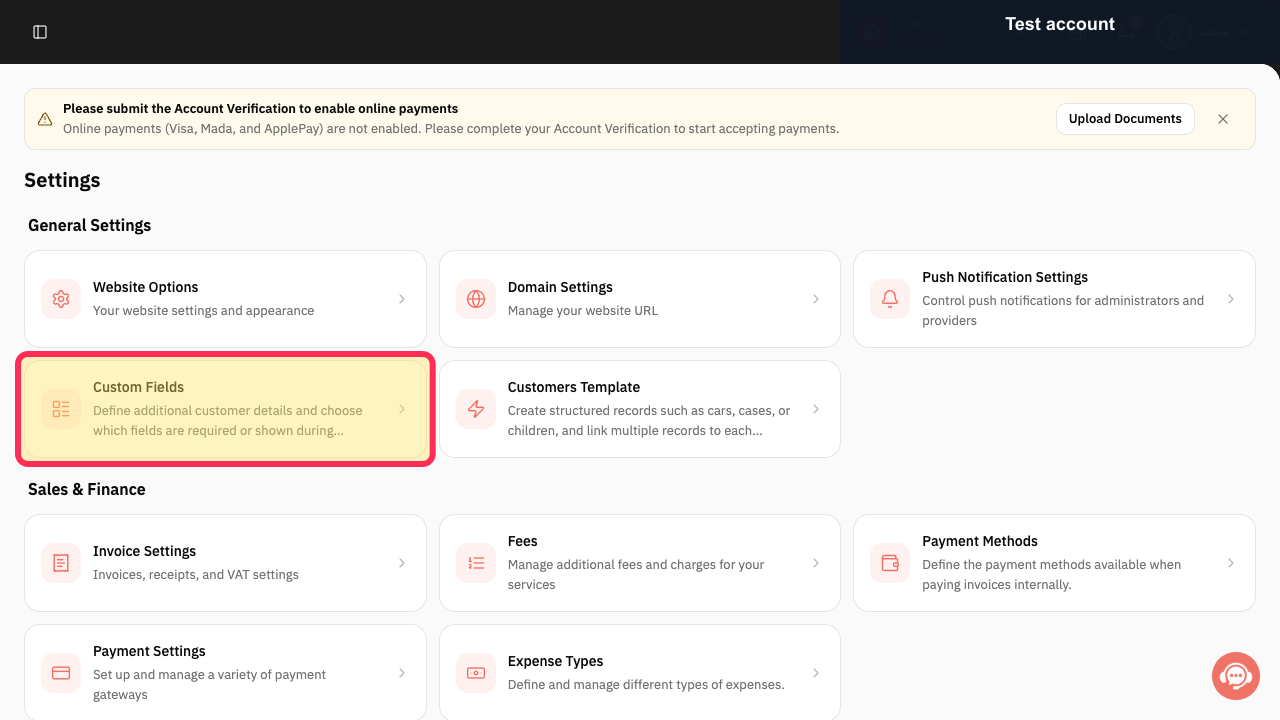
Step 2: Custom Fields are configured for customer details and checkout.
Important notes
Review each question before saving to make sure it is clear to customers.
Only collect information that is necessary to deliver the service.
Do not collect unnecessary sensitive information.
Related questions
How do I add a question to a specific service in Rekaz?
Where can I find Custom Questions for a service in Rekaz?
How can I use different questions for each service in Rekaz?


